Beyond the Transfer: Mastering DTF Sheets for Maximum Profit and Print Perfection
Table of Contents
In the rapidly evolving world of garment decoration, Direct-to-Film (DTF) printing has emerged as a true disruptor. It has democratized high-quality printing, allowing businesses of all sizes to produce vibrant, durable transfers on demand. But while much of the conversation revolves around printers and inks, the unsung hero of the process is often overlooked: the DTF sheet itself.
Whether you call it a gang sheet, a PET film, or a transfer sheet, this critical component is the foundation upon which your print quality, production efficiency, and ultimately, your profitability are built. Simply put, you cannot achieve premium results with substandard materials.
This deep dive explores everything you need to know about DTF sheets. We will move beyond the basic definitions to explore the advanced technical specifications, strategic use of gang sheets for business scaling, troubleshooting application issues, and a glimpse into the future of this transformative technology. By the end, you’ll understand why mastering your choice and use of DTF sheets is the secret weapon of successful print shops.
The Strategic Advantage of Gang Sheets in Modern Production
For the uninitiated, a standard DTF transfer involves printing a single design onto a piece of film. However, for a business aiming for efficiency, this method is financially reckless. The true power of DTF lies in the “gang sheet” .
A DTF gang sheet is a strategic layout where multiple designs—whether different graphics, sizes, or repeats of the same logo—are arranged together on a single sheet of transfer film . With roll-fed systems, these “sheets” can be continuous, extending several feet to accommodate dozens of transfers in a single print run.
The Economic Imperative The primary goal of utilizing gang sheets is simple: optimization. By consolidating prints, you achieve three critical business advantages:
Material Waste Reduction: You maximize the usable square footage of your expensive PET film and adhesive powder. The space between designs is minimized, leaving less waste .
Time Efficiency: Printing one sheet with 20 designs is exponentially faster than printing 20 individual sheets. This slashes production time and labor costs .
Energy Savings: Running your printer and curing oven for one long job consumes less energy than starting and stopping for multiple short runs.
When to Implement Gang Sheets While a hobbyist might print one-off designs, a growth-oriented business needs gang sheets for nearly every scenario :
Mixed Order Fulfillment: A single customer order for left-chest logos, sleeve prints, and a large back design can all fit on one sheet.
Batch Processing: Handling orders from multiple clients with small, unique graphics becomes feasible when you can gang them together.
Inventory Building: Creating pre-printed design packs for resellers or stocking popular designs in various sizes is made cost-effective through gang runs.
Multiples and Variations: Need the same design in three different sizes for hats, tees, and hoodies? A gang sheet is the only intelligent way to produce them.
Deconstructing the DTF Sheet: Material Science and Technical Specifications
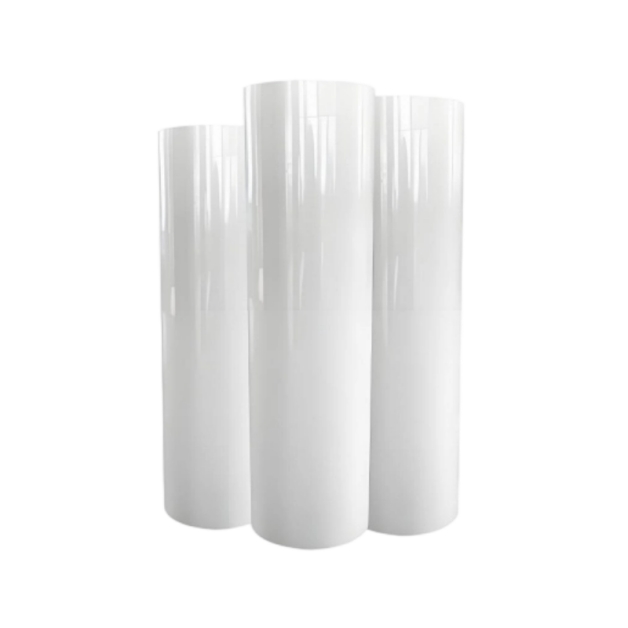
To truly master DTF, you must understand what your film is made of and how its properties dictate performance. The majority of high-quality DTF sheets are made from Polyethylene Terephthalate (PET) , a durable plastic base known for its dimensional stability and heat resistance . However, not all PET films are created equal.
Mechanical and Physical Properties
The physical characteristics of the film directly impact its ability to feed through your printer and perform under the heat press .
Tensile Strength and Dimensional Stability: A high-quality DTF sheet possesses high resistance to stretching and tearing. This is crucial as the film is pulled through roll-fed printers and subjected to the tension of the printing process. Dimensional stability ensures that the film doesn’t expand or contract with slight temperature or humidity changes, guaranteeing that your multi-pass colors register perfectly .
Thickness (Microns): Most DTF films range from 75 to 100 microns .
75–80 microns: These thinner films are ideal for highly detailed designs and lightweight garments. They offer excellent conformability and a softer “hand feel” on the final product.
90–100 microns: This is the workhorse thickness for high-volume production. The added rigidity reduces the risk of jams, misfeeds, and handling damage, ensuring smoother workflow in busy shops .
Anti-Static and Anti-Curl Coatings: Premium films, such as those from specialized manufacturers like Jinlong, incorporate advanced anti-static coatings . This prevents the film from sticking to itself or attracting dust, which can cause print defects. Similarly, high-temperature resistance coatings prevent the film from warping or curling when exposed to the heat of the printer’s curing unit or oven .
The Critical Role of Coatings
The magic of a DTF transfer doesn’t happen on the bare PET, but on the specially engineered coatings applied to it .
Ink-Receiving Layer: This micro-porous coating is designed to instantly absorb water-based inks while controlling dot gain. It holds the ink in place, preventing bleeding and allowing for sharp edges and vibrant color saturation . A poor coating will lead to dull, muddy prints.
Release Coating: This layer is the “controlled separation” mechanism. It must hold the ink and adhesive firmly during printing, powdering, and curing, but release cleanly and effortlessly during the hot or cold peel stage after pressing . If this layer is flawed, your transfer may stick to the film and ruin the garment.
Navigating the DTF Sheet Ecosystem: Types and Applications
Selecting the right DTF sheet is not a one-size-fits-all decision. The best choice depends on your specific application, target fabric, and business model. Here’s a breakdown of the different types available on the market .
By Peel Temperature: Hot-Peel vs. Cold-Peel Films
Hot-Peel Films: These films are designed to be peeled away from the fabric immediately after the heat press cycle. This allows for a much faster workflow, as you don’t have to wait for the transfer to cool. It’s a favorite among high-volume production houses .
Cold-Peel Films: As the name suggests, these require the transfer to cool down completely before peeling. Cold-peel is often favored for intricate, delicate designs, as the cooling process allows the adhesive to fully set, ensuring that every fine detail releases from the film perfectly .
By Application and Substrate
White Ink DTF Sheets: These are standard transparent films used with printers equipped with white ink. The printer lays down a white underbase first, then prints the CMYK colors on top. This method is essential for achieving vibrant, opaque designs on dark or colored garments .
Opaque DTF Sheets: These sheets feature a film with a built-in, high-opacity layer. In some cases, they can reduce or eliminate the need for a separate white ink underbase, saving ink and time. They are excellent for solid graphic designs on dark fabrics where a super-soft hand feel is less critical than bold color .
Low-Temperature Adhesive Sheets: These specialized sheets use an adhesive formulated to activate at lower temperatures (around 270-300°F or 130-150°C) compared to the standard 320°F (160°C). They are a game-changer for printing on heat-sensitive materials like nylon jackets, performance sportswear with spandex, or thin polyesters that would otherwise scorch or melt .
UV DTF Transfer Sheets: An exciting innovation for hard surfaces. These sheets are used with UV flatbed printers. The design is printed and cured with UV light onto a special A-film, then transferred to a sticky B-film. This allows for high-resolution, weatherproof decals to be applied to non-porous items like phone cases, water bottles, and metal awards without needing a complex direct-print setup .
The Software Revolution: How “Smart Nesting” Transforms Gang Sheet Efficiency
Hardware is only half the story. The modern DTF revolution is being driven by intelligent software that automates complex tasks and maximizes efficiency . Creating a gang sheet manually in Adobe Illustrator is a time-consuming puzzle. Today, RIP software and printer control interfaces are changing the game.
Advanced software solutions now offer features like automatic nesting. Instead of manually arranging designs, you simply import them, and the algorithm calculates the most material-efficient layout. It intelligently rotates and positions graphics to minimize the space between them, often increasing film utilization by 20-30% .
Furthermore, integrated software ecosystems, like xTool Creative Space (XCS) for certain printers, are blurring the lines between design and production. These platforms allow users to create designs, remove backgrounds with AI, and arrange them for printing—all within a single interface. This eliminates the need for multiple expensive software subscriptions and streamlines the entire workflow from concept to cured transfer .
The impact is profound. By automating color management, white underbase generation, and material layout, smart software reduces the skill gap needed to operate a DTF printer. It ensures consistency, reduces operator error, and can cut material waste by up to 40% compared to manual methods, directly boosting your bottom line .
Mastering the Application: A Step-by-Step Guide to Perfect Transfers
Buying the best DTF sheet is pointless if your application technique is flawed. Achieving a durable, professional-looking transfer requires precision and patience.
Preparation and Pressing
Pre-Press the Garment: Always pre-press your blank fabric for 3-5 seconds. This removes moisture and wrinkles that can create steam pockets and prevent the adhesive from bonding properly .
Positioning: Place your DTF transfer on the garment with the printed image facing up. The film should be on top of the design .
The Heat Press Cycle: Cover the transfer with a high-quality non-stick protective sheet (like Teflon or parchment paper) to protect the film and your press . Apply medium to firm pressure at the recommended temperature (typically 320°F / 160°C) for 15-20 seconds .
The Peel: A Moment of Truth
This is the most critical step. Follow the manufacturer’s instructions for your specific DTF sheet.
For Cold-Peel: Allow the transfer to cool down completely until it’s room temperature. Peeling too early can stretch the design or cause “tunneling” where the adhesive hasn’t fully set .
The Technique: Whether hot or cold, peel the film away at a sharp, flat angle, pulling it back on itself rather than lifting it straight up. This clean shearing action helps ensure all edges release from the film .
Post-Press for Perfection
For transfers that look and feel less like a sticker and more like part of the fabric, use a post-press. After peeling, cover the design again with your protective sheet and press for another 5-10 seconds. This second press re-melts the adhesive, further embedding it into the garment fibers, improving durability, and softening the hand feel.
Troubleshooting: Diagnosing and Fixing Common DTF Sheet Failures
Even with perfect technique, issues can arise. Here is how to diagnose problems related to your DTF sheets and process.
Problem: Poor Adhesion / Transfer Lifts Off
Cause: This often happens when pressing onto “sublimation blanks” which have a slick polymer coating that DTF adhesive struggles to grip .
Fix: Increase pressure and press time slightly. Ensure a full cool-down before peeling. If necessary, use a low-temperature adhesive sheet designed for tricky surfaces .
Problem: Cracking or Peeling After Washing
Cause: Incomplete curing of the adhesive powder during the initial print process, or insufficient pressure/temperature during the transfer .
Fix: Verify your curing oven temperature is accurate with an infrared thermometer. Ensure you are using firm, even pressure during the transfer press. Always wait 24-48 hours before the first wash and instruct customers to wash inside out in cold water .
Problem: Transfer Won’t Release from the Film
Cause: The most common culprit is peeling the film at the wrong temperature (e.g., peeling a hot-peel film when it’s cold, or vice-versa) . It can also be caused by insufficient heat/pressure during the press.
Fix: Double-check the manufacturer’s recommended peel method. If it’s stuck, repress the garment for another 10 seconds with firm pressure and try again, ensuring you peel at the correct angle .
Problem: Faded, Patchy, or Grainy Print
Cause: This usually points to an issue with the printer or the film’s ink absorption, not the transfer process. It could be clogged printhead nozzles or incorrect color profiles .
Fix: Run printer nozzle checks and cleanings. Ensure you are using the correct ICC color profile for your specific DTF film and ink combination. Low-quality films can also absorb ink poorly, leading to a faded look .
The Future of DTF Sheets: Innovation on the Horizon
The DTF market is far from static. Industry experts and manufacturers point to several key trends that will shape the future of DTF sheets .
Wider Formats and Industrial Integration As DTF matures, we are seeing a push beyond the standard 13-inch and 24-inch printers. The introduction of wider format machines, such as the 1.6-meter Mimaki TXF300-1600, signals a move into industrial-scale production . This allows for printing on technical textiles, soft signage, and even home furnishings like curtains, expanding the market far beyond t-shirts .
Sustainability and Material Science With increasing regulatory and consumer pressure, sustainability is becoming a key differentiator . We are seeing the rise of water-based ink DTF sheets that offer lower VOC emissions and a softer hand feel, appealing to eco-conscious brands . Furthermore, innovations in DTF papers—a paper-based alternative to PET film—are gaining traction. While they currently have limitations in vibrancy and are often cold-peel only, they offer a biodegradable option that reduces plastic waste .
AI and Automated Quality Control The integration of Artificial Intelligence (AI) into the printing workflow will further refine gang sheet creation and quality. Future software will be able to perform smart image analysis, automatically optimizing color settings and ink density for each design on a gang sheet . Predictive maintenance systems will alert operators to potential equipment failures before they cause a costly misprint on a large gang sheet, ensuring near-zero waste .
Conclusion
The humble DTF sheet is far more than just a consumable. It is a complex, engineered product that sits at the heart of your printing operation. From the strategic use of gang sheets to drive efficiency, to the meticulous selection of film types for specific applications, and the critical role of software in maximizing their potential, mastering the nuances of DTF sheets is the key to unlocking higher quality, greater profits, and a sustainable competitive advantage.
As the technology continues to evolve towards wider formats and greener solutions, staying informed about the materials you use will be just as important as the hardware you invest in. By treating your DTF sheets as a strategic asset, you ensure that your prints don’t just look good—they last, they perform, and they build a reputation for excellence that keeps customers coming back.
Subscribe
To join our mailing list and never miss our updates !